CarPlay Games: Can You Play Games on Your Car Screen?
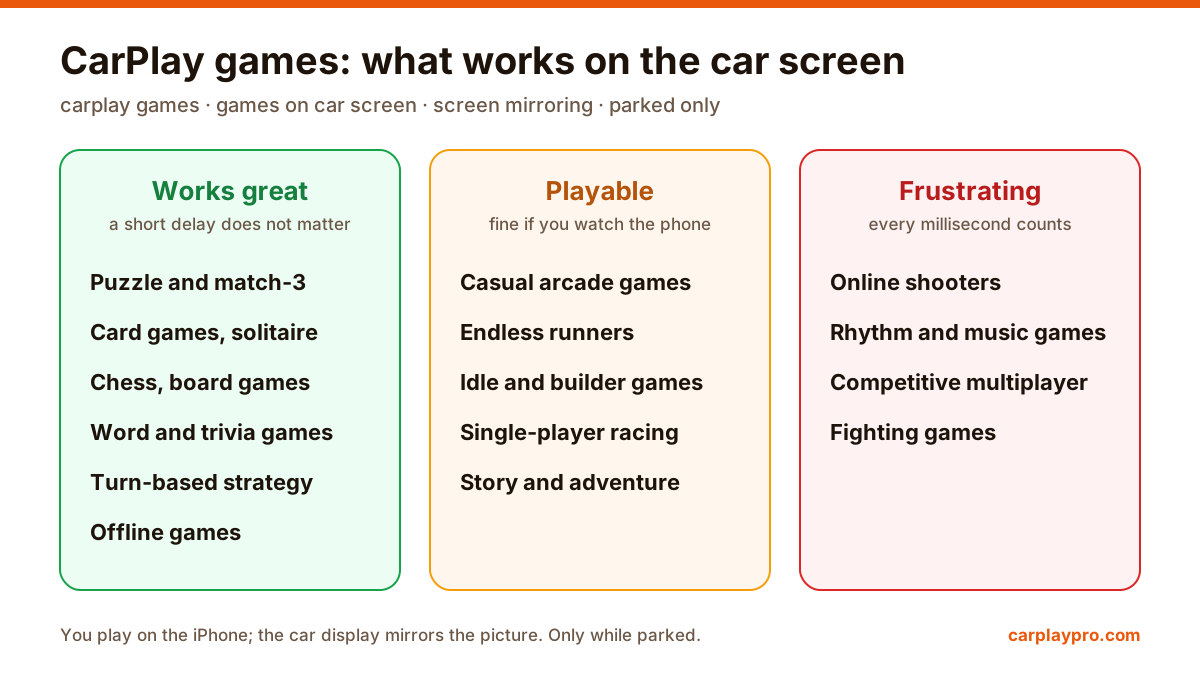
CarPlay has no games section, but you can mirror your iPhone and play car games and offline games on the car screen while parked. What works, setup, lag, battery.
The best Apple CarPlay apps for navigation, music, audiobooks, messages, EV charging and screen mirroring, with App Store ratings and what each does in the car.
 Carplay Pro 5 min read
The best CarPlay apps in 2026 are Carplay Pro for screen mirroring, Google Maps and Waze for navigation, Spotify and Apple Music for music, Audible and Pocket Casts for listening, WhatsApp for messages and PlugShare for EV charging. Apple Maps comes preinstalled and still earns its place.
A quick disclosure first: we make Carplay Pro, so of course it sits at number one. Below we explain why, and the other nine are apps we would recommend even if ours did not exist. The ratings come from the US App Store in November 2026, read through AppTrendKit.
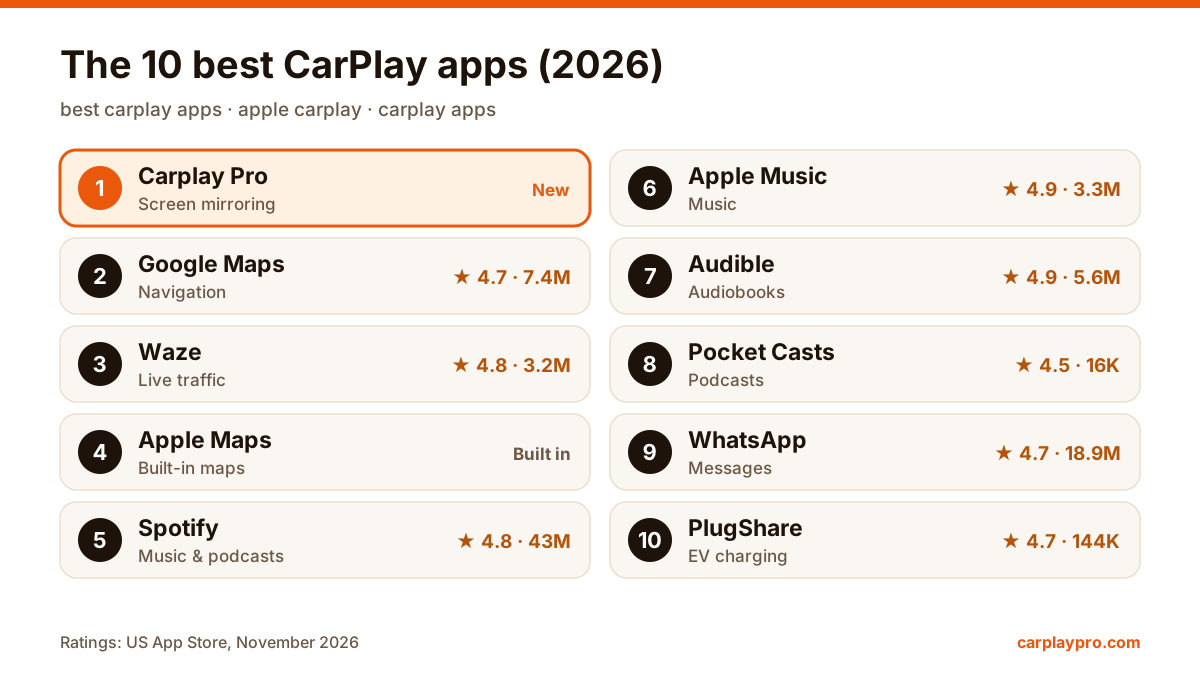
Best CarPlay apps by job. Ratings: US App Store, November 2026.
One rule: each app has to do one job better than anything else on the car screen. That leaves out apps that only add a pretty icon, and it means one pick per category instead of four navigation apps in a row. Every app here has real CarPlay support, except Carplay Pro, which works on top of CarPlay through screen mirroring (more on that below).
CarPlay only shows apps from categories Apple allows: maps, audio, messages and a few more. Carplay Pro takes a different route. It mirrors your whole iPhone screen to the car display, in landscape, so YouTube, social media, games, a browser or your photo album appear on the dashboard while you are parked. It also plays your own M3U playlists as an extra.
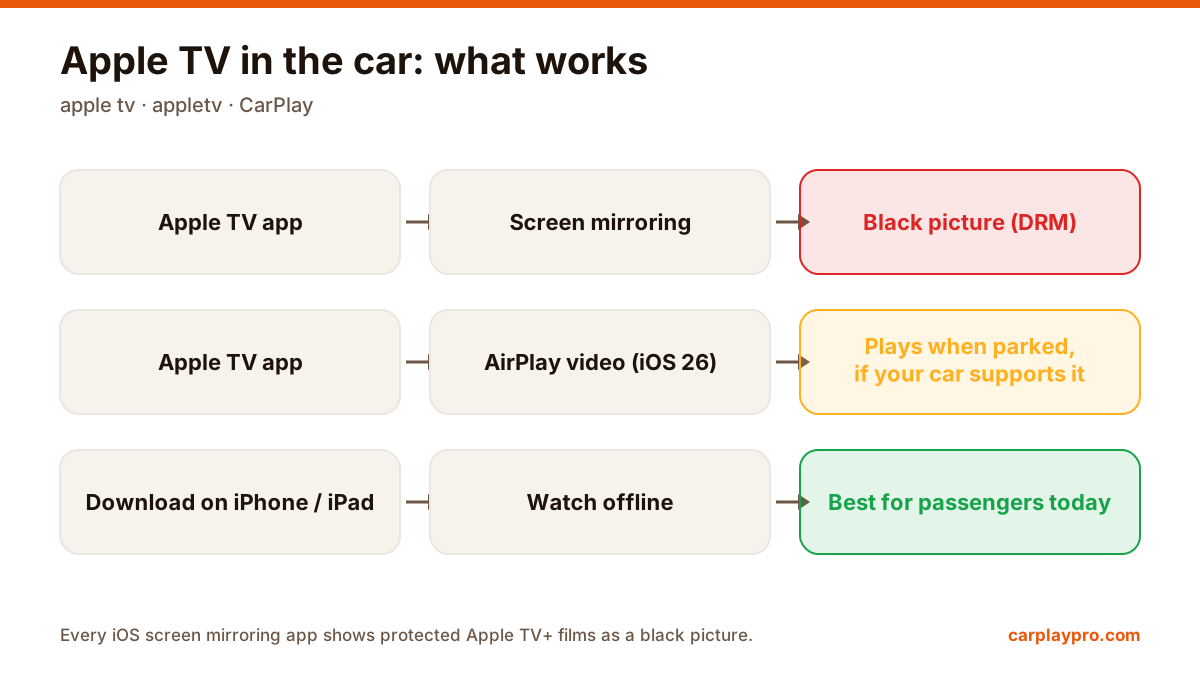
What it does not do: films from paid services that block screen capture, such as Netflix or Apple TV+, show a black picture. That is the streaming app’s protection, not something any mirroring app can change. Carplay Pro works with wireless CarPlay, or with wired CarPlay plus a wireless adapter, and it is launching soon on the App Store as a free download with an optional Pro subscription. How mirroring differs from CarPlay is explained in CarPlay screen mirroring explained.
★ 4.7 from 7.4 million ratings. Google Maps has the most complete map and business data in most countries, and offline areas you can download before a trip. That last one matters more than people expect: in a mountain pass or an underground garage, an offline area keeps directions on screen when the signal drops.
★ 4.8 from 3.2 million ratings. Waze is built on reports from other drivers: jams, accidents, road works and hazards appear on the car screen as they happen, and the route changes around them. For a daily commute through a busy city it often beats every other app. On a quiet motorway, Google Maps is calmer.
Apple Maps needs no download and works most closely with Siri and the rest of iOS. Its car-screen design is the cleanest of the three, and directions from Messages or Calendar open in it with one tap. Worth keeping as a second opinion even if Google Maps is your main app.
★ 4.8 from 43 million ratings. On CarPlay, Spotify shows your library, recent playlists and podcasts in large, easy rows. With Premium, download playlists at home before a trip through areas with weak coverage, so the music does not stop in the middle of nowhere.
★ 4.9 from 3.3 million ratings. Apple Music’s strongest point in the car is Siri: “play something relaxing” or “play the new album by…” works without looking at the screen at all. If you already pay for Apple One, it is the obvious pick.
★ 4.9 from 5.6 million ratings. Audible on CarPlay gives you chapters and playback speed on the car screen, so you can jump back after a phone call without touching the phone. Download the book before the trip; streaming an audiobook over mobile data is wasteful.
★ 4.5 from 16,000 ratings. Pocket Casts is the best third-party podcast player on CarPlay: a clear queue, variable speed and silence trimming that shortens long episodes without changing the voices. If podcasts are your main thing in the car, it is a better tool than the big music apps.
★ 4.7 from 18.9 million ratings. WhatsApp works with CarPlay through Siri: incoming messages are read aloud, and you dictate the reply. WhatsApp calls also come through the car’s speakers and microphone. It is the most widely used third-party messaging app on CarPlay, and for many people outside the US it matters more than iMessage.
★ 4.7 from 144,000 ratings. For electric cars, PlugShare shows nearby charging stations, your saved locations and planned trips on the car display, with check-ins from other drivers telling you whether a charger is working. Users report mixed results on some cars, so test it once at home before relying on it on a long trip.
iOS 26 adds widgets to CarPlay, so weather, calendar and smart-home controls can sit next to your apps without opening anything. Setup takes a minute: see CarPlay widgets in iOS 26.
If an app does not appear on your car screen at all, the problem is usually CarPlay itself rather than the app; our CarPlay not working checklist covers the usual fixes. And keep video, games and long reading for parked moments: the driver’s eyes belong on the road.
CarPlay has no games section, but you can mirror your iPhone and play car games and offline games on the car screen while parked. What works, setup, lag, battery.
Apple TV in the car is possible, but not the way most people expect. What works with CarPlay, why mirroring shows a black screen, and the real options.
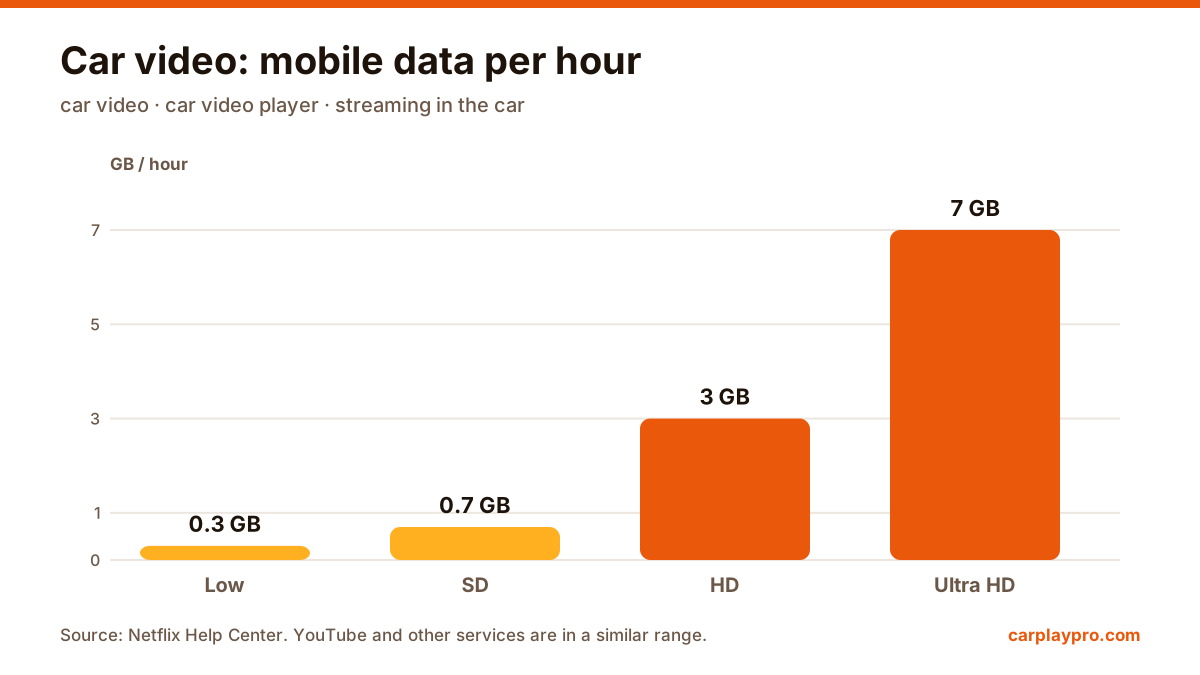
The real ways to play video on a car screen with an iPhone: USB files, screen mirroring, AirPlay in iOS 26, AI boxes and tablets, with data use for each.