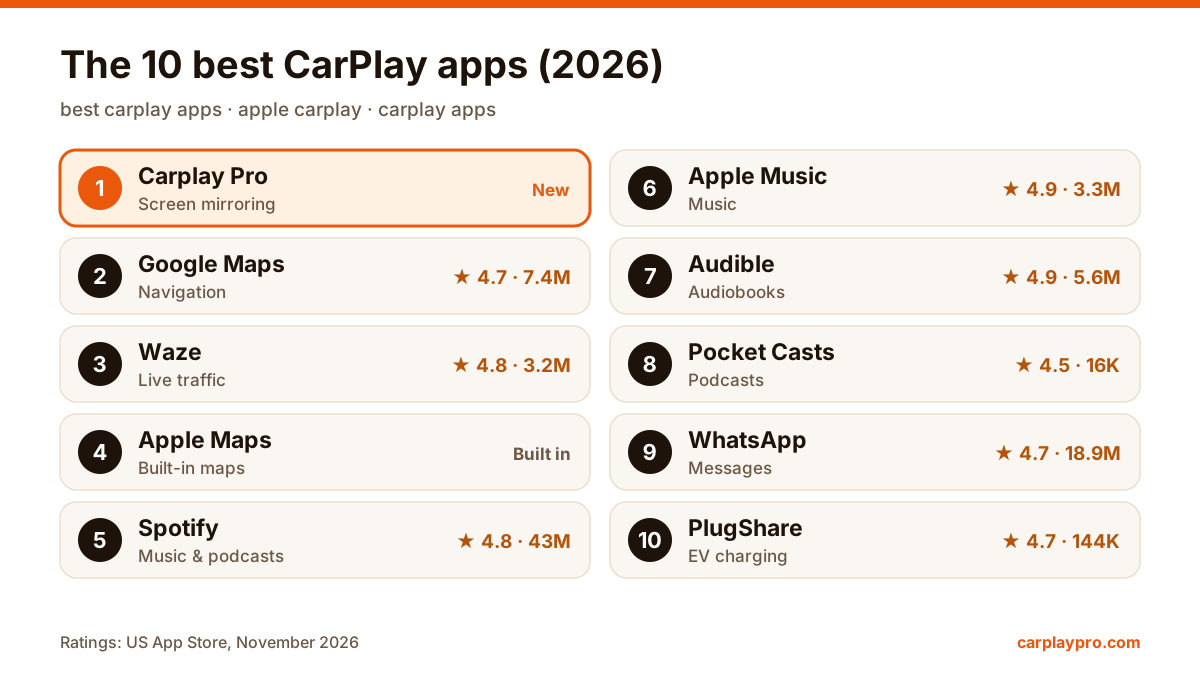
The 10 Best CarPlay Apps in 2026: Maps, Music and More
The best Apple CarPlay apps for navigation, music, audiobooks, messages, EV charging and screen mirroring, with App Store ratings and what each does in the car.
CarPlay has no games section, but you can mirror your iPhone and play car games and offline games on the car screen while parked. What works, setup, lag, battery.
 Carplay Pro 5 min read
CarPlay itself does not run games: Apple only allows apps such as navigation, audio, messaging and EV charging on the car screen, so you will not find a games section there. What does work is screen mirroring: you play a game on your iPhone while the car is parked, and the same picture shows up on the dashboard display.
You play on the phone and watch a bigger copy of it on the dashboard. Keep that in mind, because it decides which games feel good in the car and which ones will annoy you.
Search the App Store for “CarPlay games” and you get offline games, two-player games and driving simulators. None of them appear on the car display, because games are not one of the app categories CarPlay accepts. Apple keeps them out for driver safety, and the rule is the same in every car with CarPlay.
The popular “car games” you find there, from driving simulators to parking games, are ordinary iPhone games. They run on the phone like any other game, which also means they can be mirrored to the car display while you are parked.
Mirroring gets around the category problem in a different way. It does not ask the car to run a game. It sends whatever is on the iPhone screen to the display, the same way it would send a YouTube video or a photo album. If you want the full background, read CarPlay screen mirroring explained.
You need an iPhone, a car with wireless CarPlay (or wired CarPlay plus a wireless adapter) and a mirroring app such as Carplay Pro.
From here you touch the phone, not the car screen. Hold it the way you normally would and glance at the big display for the picture.
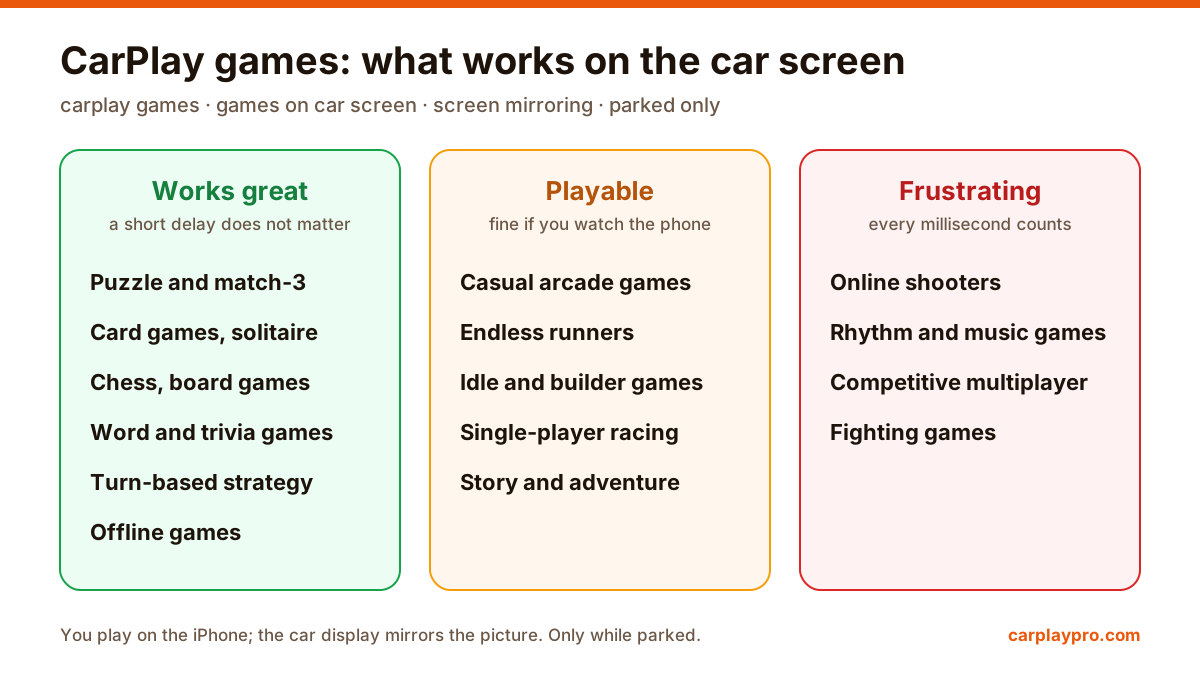
Wireless mirroring always adds a short delay between the phone and the car display. You will not notice it in a game where you take your time. You will notice it in a game where a tap has to land on the beat.
Great on the car screen: puzzle and match-3 games, solitaire and other card games, chess, word games, trivia and turn-based strategy. Many of them are offline games that need no Wi-Fi or mobile data, handy in an underground car park. Trivia games are a particular hit with passengers, because everyone can read the question on the big screen.
Playable: casual arcade games, endless runners, idle and city-builder games, single-player racing and most car games. The trick is to watch the phone for the fast moments and use the car display for the view. It feels odd for a minute and then becomes natural.
Frustrating: online shooters, rhythm games, fighting games and anything competitive. If you look at the car display while you aim or time a tap, the delay will cost you. Play these on the phone as usual, or skip them in the car.
The iPhone supports common Bluetooth game controllers, including Xbox and PlayStation controllers, and many action games work with them. A controller makes the setup more comfortable: the phone can sit in its mount while you hold the controller and watch the car display.
Two things to expect. First, wireless CarPlay already uses Bluetooth and Wi-Fi, so pair the controller before you start mirroring, and if the CarPlay connection becomes unstable with the controller on, switch the controller off and test again. Second, the delay from mirroring is still there; a controller makes it more comfortable, not faster.
Gaming is one of the hardest things you can ask of a phone, and mirroring adds more work on top. Expect the battery to drop faster than with music or navigation, and expect the phone to get warm.
Most puzzle, card and single-player games use little or no data once they are installed. Online multiplayer games use more, and some games download large updates when you first open them. Install updates at home on Wi-Fi before a trip, not in a car park on a weak 4G signal.
It earns its place when you are stuck somewhere with a seat and a screen:
If the car screen stays black or the connection drops in the middle of a game, the problem is almost always CarPlay itself rather than the game. Our CarPlay not working checklist covers the usual fixes. And keep the rule simple: games and video on the car screen are for parked moments only, never while the car is moving.
The best Apple CarPlay apps for navigation, music, audiobooks, messages, EV charging and screen mirroring, with App Store ratings and what each does in the car.
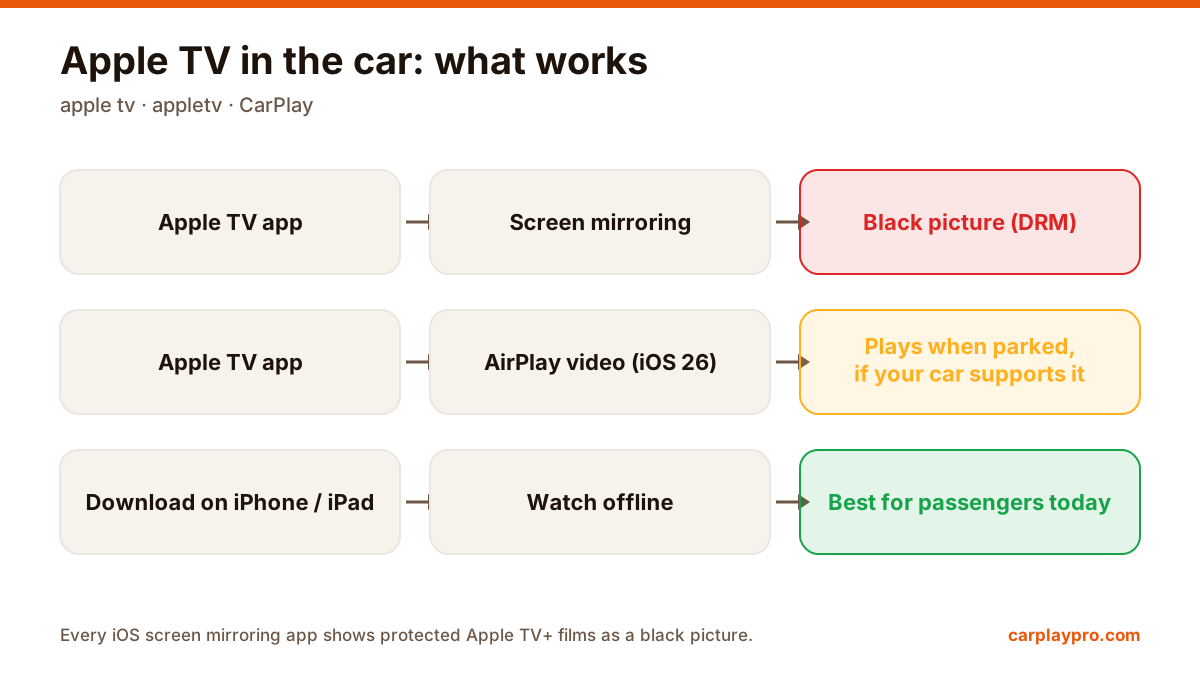
Apple TV in the car is possible, but not the way most people expect. What works with CarPlay, why mirroring shows a black screen, and the real options.
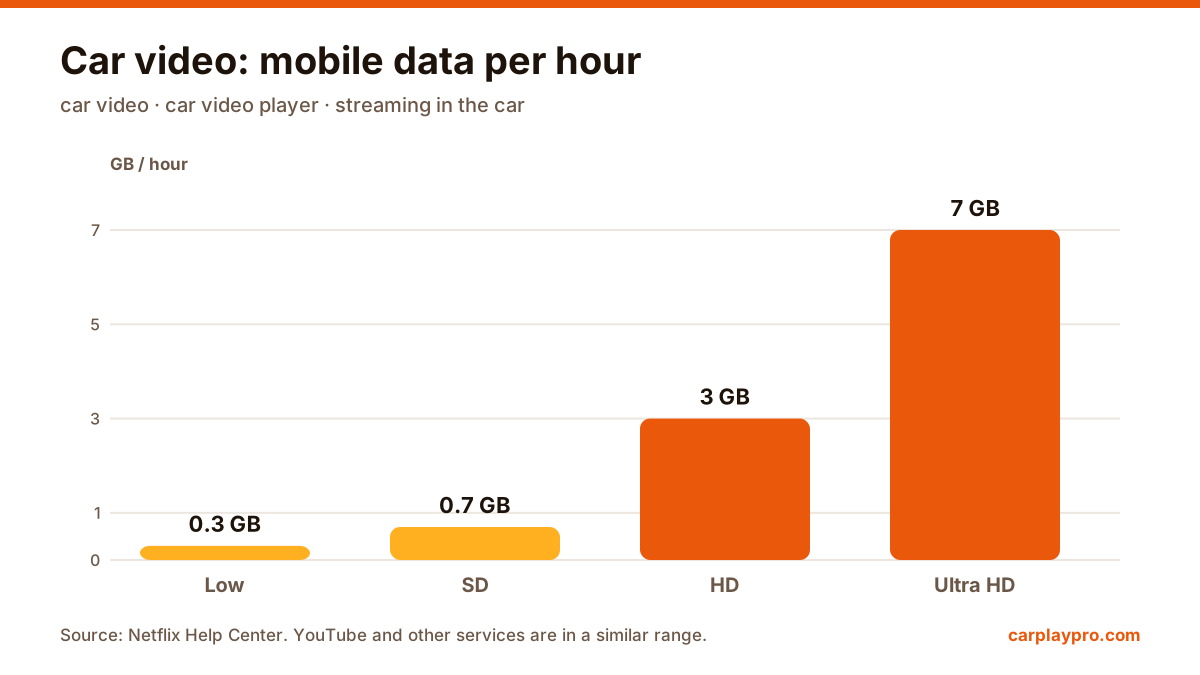
The real ways to play video on a car screen with an iPhone: USB files, screen mirroring, AirPlay in iOS 26, AI boxes and tablets, with data use for each.